
Support for backup and recovery of Linux protected systems
Our x360Recover agent for Linux has been activated for all devices.
- Linux for x360Recover fact sheet
-
Watch a demo of Linux for x360Recover in action:
- Linux backup agent installation from an appliance [Demo at 6:30]
- Linux bare metal restore from an appliance [Demo at 12:30]
- Overview: Linux installation with 3.2.0 demo and Q&A [Demo at 9:30]
Linux backup and recovery features:
- Full image-based backups (for appliances and Direct-to-Cloud)
- Local cache for Direct-to-Cloud
- Analysis Tool support
- Agent orchestration (for configuration management)
- File and folder recovery
- Bare Metal Restore (BMR)
- Full image recovery (via BMR)
- Virtual Office, BDR appliance and private vault Virtualization support of CentOS / RHEL / Rocky, Debian and Ubuntu systems
Where to download the Linux agent
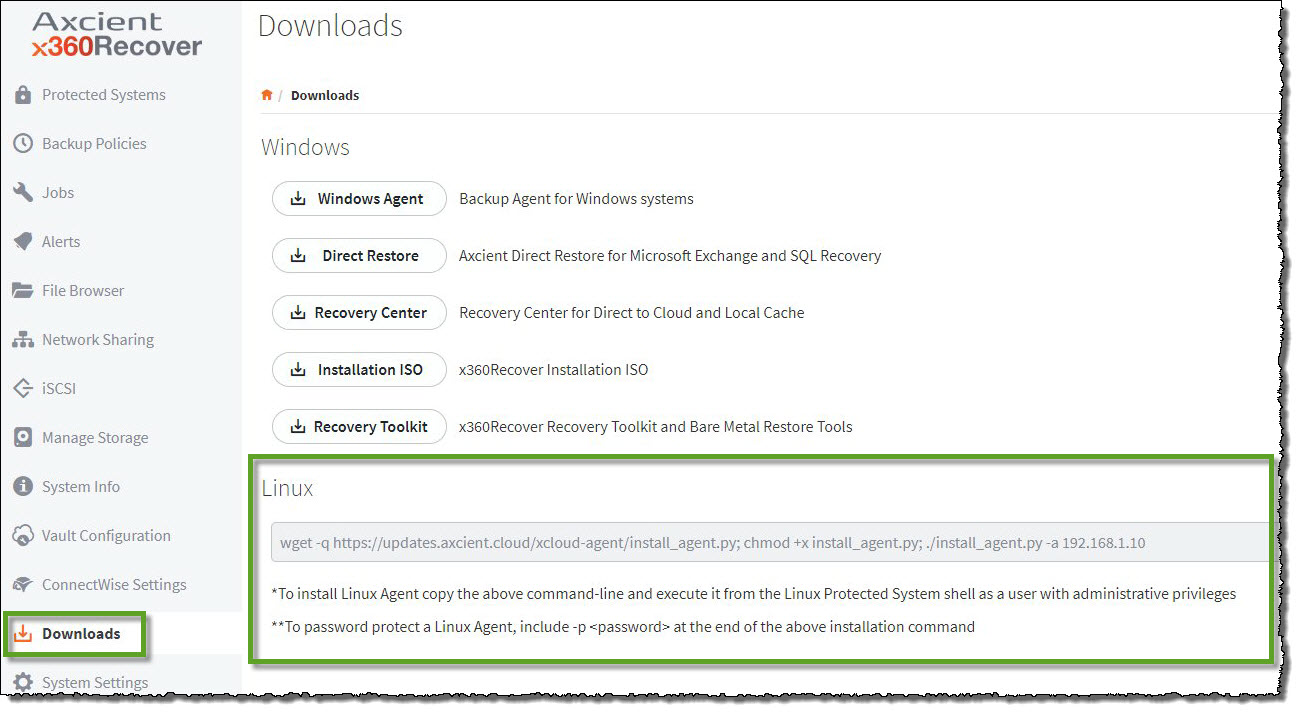
Appliances (10.18.0 or newer) will see the Linux agent installation on the Downloads page:
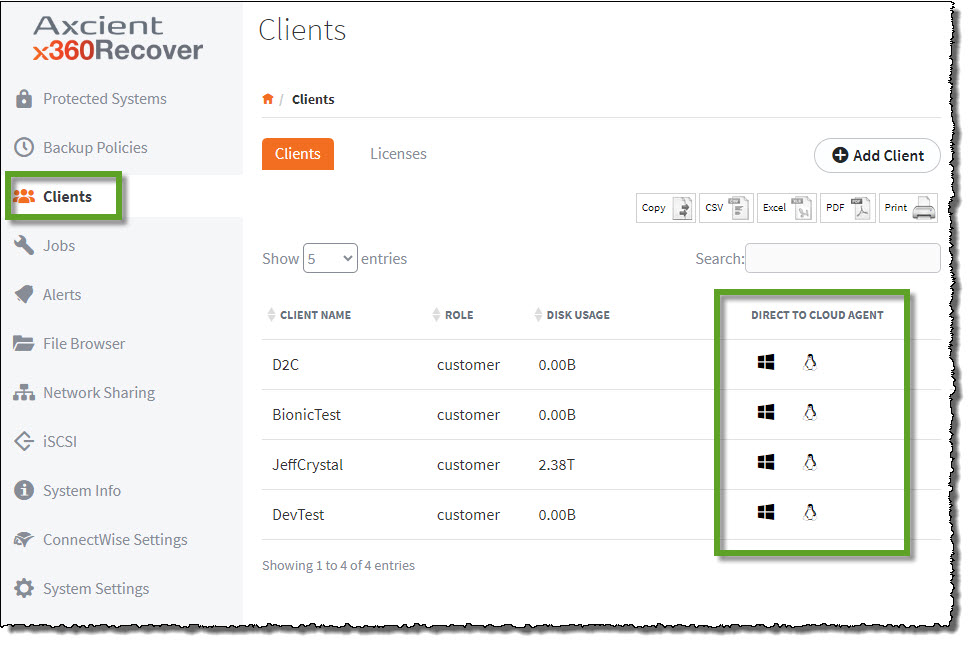
Vaults (12.2.0 or higher) can find the Linux agent installation for Direct-to-Cloud on the Clients page:
x360Recover – Supported Configurations for Linux
With appliance version 12.3.0 and newer, x360Recover provides support for backup and recovery of protected systems running various versions of Linux operating systems.
The following protected system configurations for Linux are supported:
|
Supported Linux operating systems
Debian Linux
Red Hat Enterprise Linux
Red Hat-based derivative Linux distributions
Ubuntu Linux
Ubuntu-based derivative Linux distributions
Supported networking
Supported filesystems
|
Supported database application services
Supported Virtual Disk formats
Supported DR recovery mechanisms
Supported disk and boot configurations
|
* LVM disk support is limited to single-disk LVM configurations. Multi-disk LVM pools and RAID configurations are not yet supported.
** Not all Linux distributions are certified and enabled for Virtualization. Currently we support CentOS 7, Rocky, RHEL, Debian and Ubuntu
x360Recover protected data size limitations
Storage of protected system data in the Axcient cloud is intended to fit common use cases of MSPs and their customers. We have tailored our recovery SLAs and Cloud Fair Usage policies to ensure that the vast majority of MSPs core use-cases for data protection are covered. That said, there are limitations to our bundled cloud storage and specific protected system size limits.
The Axcient Fair Use policy spells out the terms of overall cloud storage limits based on the number and type of protected systems you have protected in the Axcient Cloud. Fair Use is intended to provide a reasonable storage pool capacity which most partners will find provides virtually unlimited cloud storage for their per-endpoint protected systems (based on the expected nominal average size of typical server and workstation endpoints) while providing Axcient with a means of remediation in the event of abuse by a partner.
See: Axcient’s Fair Use Policy for details.
100TB Protected System Limit
In addition to Fair Use limitations to the total storage pool usage, there also exists a practical size limitation for a single protected system endpoint. Axcient does not support storage of any protected system in the Axcient cloud where the total data consumption for the system exceeds 100TB. This 100TB size includes not just the in-use size of the protected system, but also the total aggregate of data consumed by the protected system backup retention.
Important: Backups and replication for protected systems exceeding 100TB may be halted to ensure proper operation of the Axcient cloud.
Partners that need to provide backups for protected systems larger than 100TB may do so using Private Cloud vaults hosted in your own datacenter.
SUPPORT | 720-204-4500 | 800-352-0248
- Contact Axcient Support at https://partner.axcient.com/login or call 800-352-0248
- Free certification courses are available in the Axcient x360Portal under Training
- Subscribe to the Axcient Status page for a list of status updates and scheduled maintenance
1277 | 1339| 1385 | 1391 | 1410 | 1437 | 1443 | 1474 | 1494 | 1546 |
1592 | 1650 | 1818 | 1925 | 1961